

In this guide, you’ll discover the Top 10 Tips for Maintaining Your PLC Systems Effectively—essential strategies to keep your industrial automation running smoothly and prevent costly downtime. Whether you’re a maintenance technician, automation engineer, or plant manager, mastering these best practices will help extend the lifespan of your PLC systems, improve reliability, and ensure optimal performance. Ready to optimize your control systems? Let’s dive in!
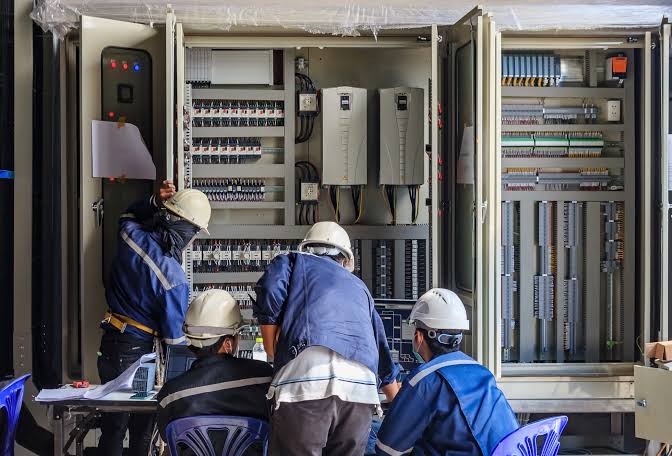
PLC Backup and Version Control
Why PLC backups are your first line of defense
When your PLC system fails, the cost of downtime can skyrocket. Regular backups are your best protection against unexpected failures. They ensure you can quickly restore control and avoid costly delays. Without a solid backup plan, you risk losing critical program data and facing lengthy repairs.
How to set a backup schedule for critical and non-critical systems
Create a routine that fits your operation’s needs.
– Critical systems: Backup daily or after any major change.
– Non-critical systems: Weekly or bi-weekly backups may suffice.
Use automated tools to schedule backups, so nothing gets missed. Consistency is key to staying prepared.
Best practices for storing, naming, and versioning PLC files
Keep backups organized and easy to find.
– Use clear, descriptive names with dates (e.g., “MainControl_2026-10-01”).
– Store files in a secure, off-site location or cloud storage.
– Maintain version control by saving incremental backups. This way, you can roll back to a previous working state if needed.
How to test restores before a real failure happens
Don’t wait for an emergency to check your backups.
– Regularly perform test restores to verify data integrity.
– Document the process and outcomes.
– Ensure your team knows how to restore systems quickly.
Testing restores keeps your backup strategy reliable and ready for action.
PLC Battery and Memory Maintenance
PLC batteries are critical for retaining program data and system settings during power outages or brief interruptions. Without a healthy backup battery, your PLC may lose important logic and configuration, leading to costly downtime. Regular inspection ensures that your system’s memory stays intact and reliable.
How often should you check and replace backup batteries? It’s best to inspect them at least once a year, especially if your PLC is in a harsh environment. Many manufacturers recommend replacing batteries every 2 to 3 years to prevent unexpected failures. Signs of a weak battery or failing memory support include unexplained resets, loss of data, or inconsistent operation.
Replacing PLC batteries safely is straightforward but requires caution. Always power down the system before replacing batteries to prevent electrical shock or static damage. Use proper electrostatic discharge (ESD) precautions—wear grounded wrist straps and work on anti-static mats—to protect sensitive components. When installing new batteries, ensure correct polarity and secure connections to avoid future issues.
Maintaining your PLC’s battery health is a small step that can save you from major control system disruptions. If you need reliable replacement parts, OUKE offers a wide range of backup batteries and memory support components, backed by expert advice and fast global shipping.
PLC Cabinet Temperature and Ventilation
Hot, damp cabinets are rough on PLC reliability. I treat control cabinet cooling and ventilation as a basic part of industrial control system reliability, because heat, humidity, and condensation can wear down modules, loosen performance, and raise downtime risk.
What I check
-
- I monitor cabinet temperature and thermal load so the PLC stays within a stable range.
- I clean filters, fans, and cooling paths before dust blocks airflow.
- I watch for weak spots in seals, gaskets, and door closures that let in humid air.
- I control condensation in harsh or outdoor environments with proper airflow and cabinet protection.
Simple rules I follow
-
- Keep vents clear and check fans on a set schedule.
- Use a thermometer or panel sensor for quick temperature checks.
- Clean faster in dusty plants, washdown areas, or outdoor installs.
- Replace worn cooling parts early instead of waiting for a fault.
Good cabinet airflow supports PLC preventive maintenance checklist work and helps me minimize PLC-related plant downtime.
Dust and Contaminant Control in PLC Panels
Contaminants like dust, dirt, and airborne debris are common culprits behind PLC failures. These particles can settle on circuit boards, I/O modules, and cooling fans, leading to overheating, static buildup, or short circuits. Regular cleaning is essential to maintain control system reliability and prevent unexpected downtime.
Safe cleaning methods are crucial to avoid damaging sensitive components. Use compressed air or a soft brush to gently remove dust from racks and I/O modules. Avoid using liquids or harsh chemicals that can cause corrosion or static discharge. When cleaning in dusty or harsh environments, increase the frequency—typically every 3 to 6 months—to ensure optimal performance.
During routine cleaning, inspect for physical damage such as cracked circuit boards, loose connectors, or signs of corrosion. Spotting these issues early helps prevent larger failures and keeps your PLC system running smoothly. Maintaining a clean, damage-free control panel is one of the simplest yet most effective ways to extend your PLC system’s lifespan.
PLC Wiring and Connection Checks
Loose terminals are one of the fastest ways to turn a stable PLC system into an intermittent-fault headache. I see this happen when vibration, heat, or a crowded cabinet slowly works a connection loose, even if it looks fine at a glance.
What I check
-
- I tighten terminal screws, inspect connectors for heat marks or corrosion, and replace anything that feels weak or slips under pressure.
- I label wires clearly and keep routing clean so I can trace I/O fast during a PLC preventive maintenance check.
- I separate power and signal wiring to reduce EMI and cut down on electrical noise.
- I avoid sharp bends, crushed insulation, and sloppy cable runs that create hidden failure points.
When a fault keeps coming back, I pair the wiring check with a PLC fault troubleshooting analysis so I can isolate the real cause faster and keep industrial control system reliability high.
Power Quality, Surge Protection, and Grounding
Unstable power can do real damage to PLC controllers and I/O modules. I have seen voltage dips, spikes, and noisy feeds cause random resets, bad inputs, and failed power supplies. In a plant setting, that turns into avoidable downtime fast.
Check Incoming Power
I test incoming power on a regular schedule and watch for:
-
- Low or high voltage
- Short dips and brief outages
- Phase imbalance
- Electrical noise on the line
A simple meter helps, but a power monitor gives a clearer picture of what is actually hitting the control cabinet. For industrial control system reliability, I want clean, steady power every time.
Use Surge Protection
I do not rely on the PLC alone to handle bad power. I protect controllers and modules with the right setup:
-
- Surge protection for PLC controllers
- Voltage regulation where the supply is unstable
- Properly rated power supplies for the load
- Separate protection for sensitive control circuits when needed
This matters even more in busy US plants where motors, drives, and welding equipment can create sharp power changes.
Ground and Bond Right
Good grounding and bonding are a must. If the cabinet ground is weak, the whole system becomes more vulnerable to noise and faults.
I keep it simple:
-
- Bond cabinet parts tightly
- Keep ground paths short and solid
- Separate power and signal wiring where possible
- Check for loose lugs and corroded connections
My Quick Rule
If a PLC keeps acting up, I do not blame the logic first. I check power quality, grounding, and surge protection first. That is often where the real problem starts.
PLC I/O Module and Field Device Testing
Ensuring the health of your I/O modules is critical for control accuracy and safety. Faulty I/O channels can cause unpredictable plant behavior, resulting in costly downtime or safety hazards. Regular testing helps catch issues early before they escalate.
How to perform digital and analog I/O checks
Start by verifying each digital input and output against expected signals. Use a multimeter or a PLC programming tool to read the status of each channel. For analog I/O, measure voltage or current levels to confirm they stay within specified ranges. Consistent testing helps identify drifting or inconsistent signals.
Detecting drifting, noisy, or stuck signals
Look for signals that fluctuate unexpectedly or remain constant when they shouldn’t. Drifting signals may indicate sensor issues or interference, while noisy signals often point to grounding or wiring problems. Stuck signals usually suggest a hardware fault or a wiring short. Regular monitoring and logging of I/O data can help spot these issues early.
Documenting I/O maps and spare channel capacity
Keep detailed records of your I/O layout, including channel assignments and wiring diagrams. This documentation simplifies troubleshooting and future upgrades. Also, regularly review spare channel capacity—having available I/O channels can prevent delays during system expansion or troubleshooting. Proper documentation and planning are key to maintaining reliable control systems.
For more on managing legacy or hard-to-find parts that support your I/O modules, visit our obsolete parts management guide.
PLC Communication Network Maintenance
Keep the data moving
When the network slips, the whole line can slow down. I treat PLC communication network maintenance as a core part of industrial control system reliability, especially on older systems like a Siemens SIMATIC S7-300 CPU 314 controller.
What I check
-
- Ethernet health: I check link status, error counts, and lost packets so I can catch weak connections early.
- Fieldbus stability: I watch for retries, timeouts, and dropped nodes on PROFIBUS, EtherCAT, and other fieldbus links.
- Serial communication: I verify baud rate, parity, and cable condition to stop noise from breaking the signal.
- Cables and connectors: I look for bent pins, loose plugs, cracked jackets, and corrosion at every touchpoint.
- Switches and network gear: I confirm power, port status, and heat buildup so a small fault does not turn into a plantwide delay.
Keep firmware steady
I only update firmware after I confirm compatibility across the full PLC network. Mixed versions can break protocol stability, cause handshake errors, and create hard-to-track faults. My rule is simple: match the settings, test the links, and keep a clean record of changes so the next troubleshooting step is fast.
PLC Spare Parts Inventory Planning
Having a solid PLC spare parts inventory strategy is essential to prevent long plant downtime. When a critical component fails unexpectedly, waiting days for a replacement can halt production and cost thousands. That’s why planning ahead is key.
Start by identifying which components should be kept in stock first. Focus on high-use items like PLC CPUs, power supplies, I/O modules, and communication cards. These are the backbone of your control system and most likely to need urgent replacement.
Next, classify your parts into critical, important, and non-critical groups. Critical parts—like CPU controllers and main power modules—must always be on hand. Important parts, such as secondary I/O modules or backup communication cards, should be stocked based on usage frequency. Non-critical parts, like minor accessories or legacy modules, can be ordered as needed.
Handling legacy and discontinued PLC platforms requires special attention. These systems often rely on hard-to-find parts, increasing downtime risk. Building relationships with suppliers who stock or can source discontinued parts, like those from Siemens or Mitsubishi, helps ensure quick turnaround. For older systems, consider maintaining a small stock of essential legacy components or planning for phased upgrades to newer, more supported platforms.
Having a well-thought-out spare parts inventory not only minimizes downtime but also saves money in the long run. It’s about balancing stock levels with your operational needs and ensuring you’re ready for unexpected failures. If you need help sourcing hard-to-find parts, OUKE offers a vast inventory of over 10,921 SKUs, including replacement components for legacy PLC systems.
Repair vs. Upgrade Decisions for PLC Systems
I do not treat every PLC fault the same. If the system is still stable and the part is available, repair can be the fastest fix. If the controller is old, the failures keep coming back, or the part is hard to source, an upgrade usually makes more sense.
When I stop repairing
-
- The same fault keeps returning.
- The PLC battery, CPU, or I/O parts are aging fast.
- The system depends on discontinued or hard-to-find parts.
- Downtime costs more than the repair itself.
- The platform no longer fits the plant’s reliability goals.
Repair or Upgrade
| Factor | Repair makes sense | Upgrade makes sense |
|---|---|---|
| Part availability | Easy to source | Legacy or discontinued |
| Downtime risk | Low | High |
| Long-term cost | One-time fix | Better total value |
| System age | Still current | Near end of life |
| Migration effort | Not needed | Worth planning |
How I compare total cost
I look past the price tag and compare the full cost of ownership:
-
- labor time
- repeat failures
- risk of lost production
- spare parts support
- future maintenance needs
That is why I check upgrade paths carefully, especially on older Mitsubishi systems. A Mitsubishi FX3U vs. FX5U PLC upgrade or repair comparison is a good example of how I weigh compatibility against long-term value.
How I plan phased migrations
I keep risk low by changing one piece at a time:
-
- backup the program first
- confirm I/O mapping before any swap
- test each section before moving on
- keep a rollback plan ready
- replace the most critical modules first
Compatible parts or new replacements
I use compatible parts when I need a fast, low-risk return to service. I choose new-generation replacements when I want better support, easier sourcing, and fewer repeat failures.
For legacy PLC systems, I also check my spare parts strategy early. With active stock across major brands and fast quote turnaround, I can keep downtime down while I decide whether repair or upgrade is the smarter move.
PLC Maintenance Checklist and SOPs
Turn Tips Into SOPs
I turn every PLC maintenance task into a simple standard procedure so nothing gets missed during a busy shift. A solid PLC preventive maintenance checklist should cover backups, battery checks, cabinet cooling, wiring, power quality, I/O testing, and network checks.
Keep It Short and Clear
-
- Assign one owner for each task.
- Set a fixed schedule for critical and non-critical systems.
- Use the same format for every site, line, and panel.
- Record exact part numbers for legacy PLC system support, such as Siemens SIMATIC S7-300 CPU 314 controllers.
Train And Track
I train technicians and operators on the same SOPs so maintenance stays consistent across shifts. I also log incidents, repairs, and recurring failures to spot patterns early, reduce PLC-related plant downtime, and keep industrial control system reliability on track.
PLC Maintenance FAQs
I keep these PLC maintenance FAQs simple because most plant problems come down to the same few issues: missed inspections, weak batteries, bad power, and not having the right spare parts ready.
How Often Should PLC Systems Be Inspected?
I inspect critical PLC systems on a set schedule, then tighten the cadence in harsh environments.
-
- Daily or weekly: quick visual checks for alarms, heat, dust, and loose wiring
- Monthly: review battery health, cabinet cooling, and obvious wear
- Quarterly or semiannual: test I/O behavior, communication health, and backup restores
- After any event: inspect after outages, overloads, vibration, or water exposure
For Siemens-focused systems, I also keep a simple checklist tied to Siemens PLC efficiency tips so inspection work stays consistent.
What Causes Most PLC Downtime?
In my experience, the biggest causes are preventable.
-
- Power quality issues like surges, dips, or poor grounding
- Heat and contamination inside the control cabinet
- Loose terminals and damaged wiring
- Failed batteries that wipe memory or stop a clean restart
- Old or discontinued parts that take too long to replace
These are the same problems that hurt industrial control system reliability and drive unnecessary plant downtime.
How Do I Know a PLC Battery Needs Replacement?
I treat the battery as a small part with a big job: keeping data alive when power drops.
-
- Replace it on a planned PLC battery replacement schedule
- Watch for low-battery alarms, memory warnings, or lost time/date settings
- Swap it before the next outage if the battery is already near end of life
- Use safe handling and ESD precautions during replacement
If the battery supports memory backup, I do not wait for failure. That is how I avoid avoidable program loss.
What Parts Should Always Be Kept as Spares?
I keep the spares that cause the longest shutdown if they fail.
-
- PLC CPU modules
- Power supplies
- I/O modules
- Communication modules
- Backup batteries
- Key sensors, connectors, and cables for critical loops
For legacy PLC system support and upgrades, I also hold replacement parts for discontinued platforms when possible. That is the fastest way to protect a spare parts strategy for PLC systems and minimize PLC-related plant downtime.
When Should I Repair a PLC Instead of Upgrading?
I repair when the system is still supportable and the fix is clean.
-
- Repair if the fault is isolated and parts are still available
- Upgrade if the platform is obsolete, unstable, or too costly to keep alive
- Compare downtime cost, spare availability, and long-term support
- Use phased migration when the plant cannot absorb a full cutover
I usually lean toward upgrade when repeated failures, scarce parts, or outdated communication networks start slowing the whole line down.
Fast Rule of Thumb
If the PLC is still reliable, I maintain it.
If it is failing often, missing spares, or slowing recovery, I plan the repair-vs-upgrade move early.