

Thinking about upgrading your Mitsubishi PLC or just repairing your current FX3U-48MT? You’re not alone. Making the right choice can save you time, money, and headaches down the line. Whether you’re weighing the benefits of FX5U-48MT or trying to troubleshoot your existing system, understanding the technical differences, costs, and future-proofing is essential. In this guide, you’ll discover how to make an informed decision—whether to stick with repairs or take the leap into a smarter, faster automation solution. Let’s get started.
Mitsubishi FX3U-48MT vs FX5U-48MT: PLC Upgrade or Repair Decision Guide
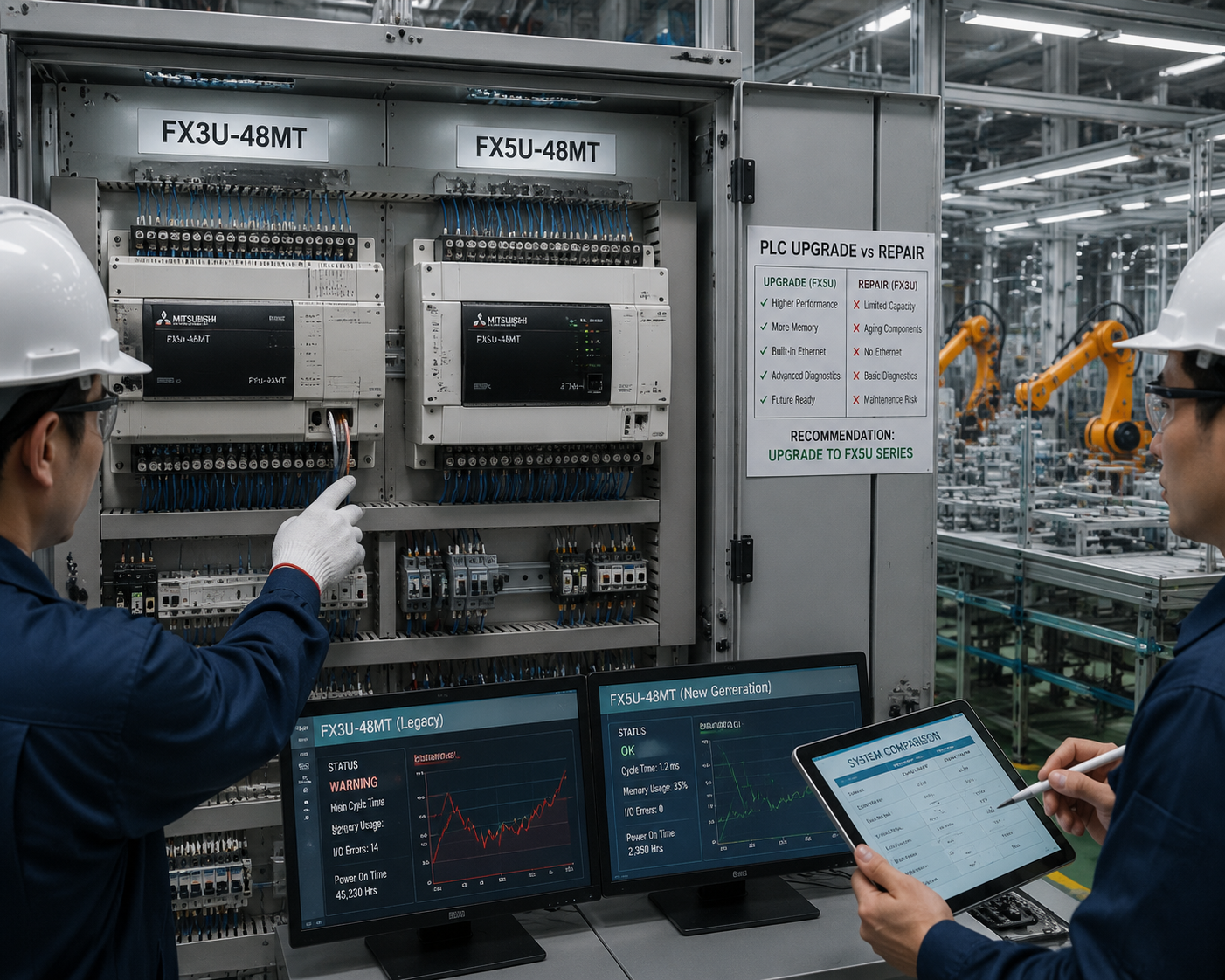
Are you trying to decide whether to repair your Mitsubishi FX3U-48MT or upgrade to the FX5U-48MT? You’re not alone. Many plant managers and automation professionals face this question every day. The right choice depends on your current equipment condition, your production needs, and your long-term goals.
So, what’s the main difference between FX3U and FX5U?
Simply put, the FX5U offers faster processing, better communication options, and more future-proof features. But is upgrading
FX3U-48MT and FX5U-48MT Overview
The FX3U-48MT is a classic Mitsubishi PLC known for its reliability in many industrial automation setups. It’s commonly used in manufacturing, packaging, and process control where straightforward control tasks are needed. This model does well in simple automation but can encounter common failure points like module wear, contact corrosion, or power supply issues after years of operation. Repair costs are usually low for minor issues, but larger hardware failures can become costly and time-consuming.
On the other hand, the FX5U-48MT is Mitsubishi’s newer generation PLC built for modern industrial environments. It features faster processing, higher memory capacity, and more flexible communication options. The FX5U is designed to handle complex tasks—integrating with networks, advanced HMI systems, and communication protocols—making it ideal for expanding automation systems or upgrading existing setups. Its improved performance and performance stability better support long-term plant needs in today’s fast-paced industry.
These two Mitsubishi PLC models are often compared when deciding whether to repair an aging system or upgrade to the latest technology. As production demands grow or become more complex, upgrading to the FX5U often makes sense for future-proofing. But if the FX3U is still running reliably and the repair costs are minimal, staying with it can be more cost-effective. Understanding the basics of each, along with their strengths and limitations, helps in making the right decision aligned with your operational needs.
FX3U-48MT vs FX5U-48MT Technical Comparison
When it comes to deciding whether to repair your Mitsubishi FX3U-48MT or upgrade to FX5U-48MT, understanding their technical differences is crucial. Here’s a clear breakdown of key specs to help guide your decision:
| Feature | FX3U-48MT | FX5U-48MT |
|---|---|---|
| CPU Speed & Performance | Moderate, slower scan time | Faster, higher processing speed, reduces cycle time |
| Memory & Program Capacity | Up to 60 KB, limited data handling | Up to 128 KB, supports larger programs and data |
| I/O Structure & Expansion | Fixed, limited I/O options | Modular I/O expansion, more flexible for system growth |
| Built-in Communication Ports | Serial, optional Ethernet | Ethernet, USB, serial, ready for modern connectivity |
| Power Consumption & Heat | Lower power, suitable for simple setups | Slightly higher power, requires good cooling for stability |
| Physical Size & Mounting | Compact, fits panel easily | Slightly larger but still suitable for panel mounting |
| Programming Environment | GX Works2, legacy support | GX Works3, modern software & easier migration |
In short:
- The FX5U offers faster processing and more memory, making it ideal for complex or expanding automation systems.
- The FX3U remains effective for simple tasks but might become limiting as your system grows.
Choosing between repair and upgrade hinges on your current needs and future plans. If your system demands speed, larger capacity, and better connectivity, upgrading to FX5U-48MT can be more cost-effective long term. Conversely, if the FX3U is still meeting your immediate requirements, repairing it could save money while avoiding unnecessary complexity.
Repair vs Upgrade Cost Comparison
When choosing between repairing your FX3U-48MT or upgrading to FX5U-48MT, understanding the costs involved is key.
FX3U-48MT Repair Costs
Reparing an FX3U-48MT typically ranges from around $200 to $600, depending on the failure and parts needed. Common issues like module wear, bad I/O points, or power supply problems often require just replacements or minor fixes, making repairs relatively affordableSee common faults and solutions.
FX5U-48MT Upgrade Costs
Upgrading to FX5U-48MT involves a bigger investment. Expect to spend between $1,500 and $3,000 or more, including the new PLC unit, additional hardware, installation, and system configuration. Shipping, labor, and downtime also add to the price.
| Cost Component | FX3U Repair | FX5U Upgrade |
|---|---|---|
| Parts | $100 – $400 | $1,000 – $2,500 |
| Labor | $100 – $200 | $500 – $1,000 |
| Shipping | $50 – $100 | Included or $100+ |
| Downtime | Short | Longer due to installation/learning curve |
Hidden Costs of Repeated Repairs
Repeated repairs can lead to cumulative costs—parts wear out faster, downtime impacts production, and ongoing support for old systems gets harder to sustain. Sometimes, the cost of fixing an aging system adds up, making short-term savings false economy.
Long-term Value & Total Cost of Ownership
While repairing may seem cheaper upfront, ongoing repairs can inflate total costs over time. Upgrading to FX5U offers better performance, efficiency, and future support, often resulting in lower total ownership costs.
ROI Perspective
If your system frequently breaks down or needs updates, the ROI of upgrading leans strongly in favor of FX5U—especially when factoring in increased productivity, reduced downtime, and lower maintenance costs.
In , quick repairs are economical if issues are minor and parts are available. But for long-term stability and performance, a well-planned upgrade can save money and hassle down the road.
Performance and Reliability
The FX5U-48MT improves on speed and control compared to older models like the FX3U-48MT. It offers faster processing times, which means quicker responses and more precise control—crucial for complex automation tasks. If your system needs to handle more data or faster cycles, upgrading to FX5U can make a noticeable difference.
But when is the FX3U still reliable enough to keep running? If your current FX3U system is stable, with no frequent breakdowns, and your process doesn’t require rapid updates, it might still serve you well. Many plants keep their FX3U systems operating for years, especially with regular maintenance.
That said, old PLCs like the FX3U face common breakdowns and aging risks. Over time, modules wear out, and spare parts become harder to find, especially as support from Mitsubishi diminishes. These issues can lead to increased downtime, which hits production hard—whether it’s delays, quality issues, or maintenance costs.
Downtime caused by unreliable PLCs impacts overall plant output. Frequent repairs or unexpected failures can disrupt workflows, making streamlined production challenging. Reliable control systems like the FX5U reduce this risk, offering long-term stability and less maintenance fuss.
Ultimately, reliability affects your maintenance planning and the overall efficiency of your plant. If your current FX3U system is aging, and repair costs are rising or support is limited, considering an upgrade to FX5U might be the smarter move to keep your operations running smoothly.
Compatibility and Migration Issues
Can I replace an FX3U-48MT with an FX5U-48MT without major changes?
While both PLC models are Mitsubishi’s popular offerings, upgrading from an FX3U to an FX5U isn’t a straight drop-in process. You need to consider wiring, I/O mapping, and hardware compatibility. The FX5U uses different modules and connection protocols, so some rewiring or hardware adjustments might be necessary.
When it comes to program conversion and code migration, it’s important to note that the older FX3U programs may need rewriting or reconfiguration for the FX5U’s environment. The FX5U supports more advanced programming features, so reviewing and updating logic is often required.
Communication aspects like connecting to HMIs, drives, sensors, and networks are also key. The FX5U offers modern Ethernet and communication ports that differ from FX3U’s serial-based options. Ensuring compatibility might involve updating interface modules or configuring network settings.
Firmware and module support are critical too; some older FX3U modules may not be compatible or supported anymore. For seamless system integration, check system firmware versions, available modules, and support documentation.
What to check before changing the PLC model:
- Confirm wiring and I/O compatibility
- Verify that your program logic can be migrated or requires rewriting
- Ensure your communication protocols (Ethernet, USB, serial) are supported
- Check firmware and module support status
- Plan for hardware upgrades or replacements if needed
Before making the switch, it’s wise to do a detailed compatibility check to avoid unexpected downtime. For comprehensive system migration, review the Mitsubishi PLC migration guidelines, which offer practical advice on such transitions.
When to Repair the FX3U-48MT
Deciding whether to repair your FX3U-48MT depends on several factors. First, look for signs that indicate it’s worth fixing instead of replacing. Common indicators include simple issues that can be resolved with low-cost fixes, such as minor firmware glitches, relay contacts wearing out, or communication setbacks that don’t affect core operations. If the problem stems from a hardware component that’s still available and easy to replace, repairing is often the fastest and most budget-friendly option.
Production environments with minimal downtime needs can benefit from repairs, especially if the PLC is still reliable and the failure is minor. For example, when parts like I/O modules or power supplies are worn but not failed catastrophically, fixing them on-site avoids lengthy system shutdowns.
Here’s a quick repair decision checklist:
- Current condition of the FX3U-48MT: Are issues minor or critical?
- Availability of spare parts: Can you get components quickly?
- Cost of repair vs. upgrade: Is fixing cheaper than replacing?
- System reliability: Will repairs restore full function effectively?
- Production schedule: Can downtime for repairs be scheduled easily?
However, keep in mind that repeatedly repairing an older PLC can carry risks. Each repair slightly increases the chance of more failures, especially if the system is aging and other components are close to failing. Sometimes, frequent fixes can lead to higher long-term costs and potential system instability. For this reason, it’s wise to weigh the immediate benefits against future reliability when deciding whether to continue repairing or plan a full upgrade to a newer system like the FX5U-48MT.
When to Upgrade to FX5U-48MT
Deciding it’s time to upgrade your FX3U-48MT to an FX5U-48MT depends on several clear signs that your current setup is holding back your operation. If your PLC is starting to show limitations in processing speed, communication, or expansion options, it’s likely time for an upgrade.
Signs the FX3U is holding back performance include slow cycle times, repeated downtime, or difficulty integrating new modules or communications protocols. When your system can’t keep up with production demands or new technology requirements, upgrading makes sense.
Future expansion needs are another reason. If you’re planning to add more I/O modules, integrate with newer HMIs, or connect to advanced network systems, the FX5U provides more flexible I/O options and easier scalability. It’s designed for modern manufacturing where quick adjustments and growth are common.
When the control system needs faster processing and better communication, the FX5U excels with its improved CPU and communication ports like Ethernet and USB. This can make a big difference in reducing cycle times and boosting overall efficiency.
Obsolescence concerns also come into play. As the FX3U ages, support from Mitsubishi can become limited, and replacement parts may be harder to find. Upgrading to FX5U ensures compatibility with current and future systems, keeping maintenance costs predictable and support available.
Here’s a simple upgrade decision checklist:
- Is the current PLC slowing down your production?
- Do you need to connect more devices or communication protocols?
- Are replacement parts for FX3U becoming scarce?
- Will expansion or new features boost productivity?
- Is your system approaching the end of its supported lifecycle?
Situations where upgrading gives better long-term value include scenarios with increased automation complexity, upcoming capacity expansion, or the need for faster processing. While initial costs are higher, the improved performance, reliability, and future-proof features often make the FX5U a smarter long-term investment.
If these points sound familiar, it’s worth considering an upgrade from the FX3U-48MT to the FX5U-48MT. This step can help you stay competitive, reduce downtime, and prepare for future automation demands.
Step-by-Step PLC Decision Guide
Making the right choice between repairing your FX3U-48MT or upgrading to FX5U-48MT starts with a clear process. Here’s a simple guide to help you evaluate your current system and decide what’s best for your plant.
How to inspect the current FX3U-48MT condition
Begin with a detailed diagnostic of your existing PLC:
- Check for common failure points like I/O modules, power supplies, or communication ports.
- Review recent troubleshooting logs and maintenance records.
- Test its processing speed, scan times, and stability under load.
- Determine if the hardware shows signs of aging, such as worn-out modules or support limitations.
For more troubleshooting tips, consider consulting FX3U repair resources to gauge repair feasibility.
How to estimate repair cost and downtime
Next, gather estimates:
- Get quotes for parts needed to fix or replace problematic modules.
- Calculate labor costs based on your maintenance team’s rates.
- Factor in potential downtime: how long will the repair take and how will it impact production?
- Don’t forget shipping costs for parts, especially for older modules that might be hard to find.
How to compare repair cost against upgrade cost
Compare the total repair expenses with the cost of an FX5U-48MT upgrade:
- Include costs for new hardware, professional installation, and system testing.
- Consider ongoing expenses like support for aging FX3U modules versus newer FX5U features.
- Think about future-proofing—will a repair extend your system’s life enough, or is an upgrade a smarter investment?
How to decide based on machine criticality, budget, and lifespan
Make your decision by balancing:
- The importance of this PLC to your operation. Is it critical to maintaining production?
- Your budget constraints—can you afford a high-quality upgrade now or is repair the better short-term solution?
- The expected lifespan of the current system versus the new FX5U-48MT, which offers better performance and future expansion options.
Simple decision matrix for repair or upgrade
| Situation | Recommended Action | Why? |
|---|---|---|
| Minor aging signs, low criticality | Repair FX3U | Low cost, quick fix, system still reliable |
| Major failure, support limited | Upgrade to FX5U | Long-term value, better performance, future-proofing |
| Tight budget, system still stable | Repair FX3U | Avoid upfront costs, extend life temporarily |
| Need faster processing, more I/O | Upgrade to FX5U | Meet current and future automation demands |
Best next step based on your plant needs
Review your plant’s goals:
- If reliability and high performance are essential, upgrading to FX5U-48MT makes sense.
- If your system still operates well and repairs are cost-effective, maintaining the FX3U might be better temporarily.
- For more guidance, check out our PLC lifecycle planning tips to keep your automation system running smoothly.
This straightforward process helps you weigh options carefully, ensuring your automation investment aligns with your plant’s needs and budget.
Best Practices for PLC Lifecycle Planning
To keep your Mitsubishi FX3U-48MT or FX5U-48MT system running smoothly and avoid costly downtime, it’s essential to adopt a solid PLC lifecycle management plan. Here are some proven strategies to reduce failures and plan for future needs.
Reduce Failures in Aging PLC Systems
- Regular preventive maintenance is key. Clean modules, check for loose connections, and update firmware when available.
- Keep an eye on wear and tear—parts like power supplies and signal modules tend to degrade over time, increasing the risk of unexpected failures.
- Develop a routine troubleshooting procedure that includes testing critical power and communication ports, which are common failure points in older PLCs.
Preventive Maintenance for Mitsubishi PLCs
- Schedule routine inspections, including checking for dust buildup, corrosion, and overheating.
- Maintain a spare parts inventory for critical modules like the FX3U-48MT, to minimize downtime in case of failure.
- Use diagnostic tools and logs to catch issues early, especially if your PLC system is integrated into complex automation processes.
Plan a Controlled Upgrade Path
- Create a
FAQs About FX3U-48MT vs FX5U-48MT
Can FX3U be upgraded directly to FX5U?
No, the FX3U cannot be upgraded directly to the FX5U. These models use different hardware architectures and software environments. Upgrading from FX3U to FX5U generally involves replacing the entire PLC system and migrating your program to the new platform. It’s often practical to evaluate whether an upgrade makes sense based on your current system needs and future expansion plans, especially considering compatibility and migration effort.
Is FX5U backward compatible with FX3U systems?
FX5U is not fully backward compatible with FX3U. While some programming concepts remain similar, hardware differences mean you’ll need to reconfigure I/O modules, wiring, and sometimes rewrite or adapt existing programs. If maintaining existing setups is critical, planning a smooth migration process by reviewing communication protocols and hardware interfaces is