

If your CNC machine or motion axis suddenly stops and the operator panel shows sinamics s120 fault f30001, you are dealing with an overcurrent trip in the motor module. This is one of the most common hardware-protective faults on the S120 platform, and it demands a methodical approach. In our repair lab, we see this fault most often on SINAMICS S120 single motor modules running high-dynamic spindle or servo axes. The good news: many causes are external to the drive itself and can be fixed on the shop floor without replacing hardware.
What Does SINAMICS S120 Fault F30001 Mean?
sinamics s120 fault f30001 is a hardware-level overcurrent fault. It triggers when the current flowing through the IGBT output stage of the motor module exceeds the internal protection threshold. Unlike software current limits (which can be adjusted in parameters), F30001 is a hard shutdown. The module disables its pulse output immediately to protect the power semiconductors.
When sinamics s120 fault f30001 appears, you will usually see the following symptoms:
- The drive displays F30001 on the CU320 or TP screen
- The corresponding motor axis loses servo enable (SON drops)
- The machine stops with a “drive not ready” status
- Restart attempts fail until the fault is acknowledged and the root cause is removed
Because the threshold is hardware-based, simply increasing parameter limits will not clear this fault. You must find and eliminate the source of the excess current.
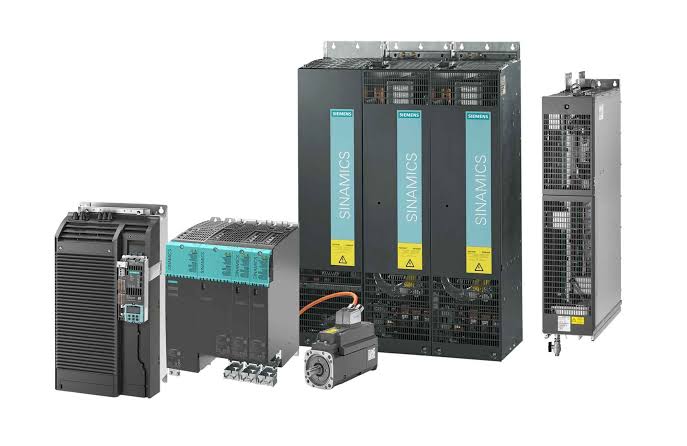
Common Causes of F30001 on S120 Drives
Through field service data and our own repair records, the root causes of sinamics s120 fault f30001 follow a clear pattern. Here they are ranked by how often we encounter them:
The table below summarizes the five most common root causes of sinamics s120 fault f30001 that we see in the field:
| Cause | Frequency | Typical Indicator |
|---|---|---|
| Shorted motor cable or winding | ~35% | Fault appears immediately at enable or during ramp-up |
| Mechanical blockage or overload | ~25% | Fault occurs under load, often at high torque demand |
| IGBT or power stage damage in the module | ~20% | Fault persists even with motor disconnected |
| Encoder feedback error causing runaway | ~12% | Speed or torque oscillates just before trip |
| Incorrect current controller parameters | ~8% | Fault after commissioning, parameter download, or replacement |
Notice that the top two causes are external to the drive module. This means roughly 60% of sinamics s120 fault f30001 trips do not require a new drive at all.
How to Troubleshoot F30001: A 5-Step Process
Use this sequence to narrow down the source of sinamics s120 fault f30001 safely. Do not skip steps, because the fastest way to destroy a replacement module is to install it without fixing the real cause first.
- Step 1: Power down and inspect the motor cable. Disconnect the motor cable at both the drive terminal and the motor junction box. Measure phase-to-phase and phase-to-ground resistance with a megohmmeter. Any reading below 1 MΩ to ground or unbalanced phase resistance points to a cable or motor winding fault. Replace the cable first, then retest.
- Step 2: Check mechanical load and axis movement. With the servo disabled, try to rotate the motor shaft by hand or through the machine ball screw. Look for binding, seized bearings, or crashed tooling that creates a mechanical lock. A jammed axis will pull excessive current the moment the drive attempts to move it. Free the mechanism before re-enabling the drive.
- Step 3: Test the motor module without a motor connected. Remove all motor output wires from the module terminals. Power up the control unit and enable the drive. If sinamics s120 fault f30001 still appears with no motor cable attached, the IGBT or current sensing circuit inside the module is damaged. At this point, the module needs professional evaluation. You can read more about overcurrent alarm diagnosis in our servo troubleshooting guide.
- Step 4: Verify encoder wiring and feedback polarity. Swap the encoder cable or inspect the DRIVE-CLiQ connection for bent pins or poor shield grounding. A lost or inverted speed feedback signal can cause the current controller to saturate in an attempt to correct a nonexistent speed error. If your application allows, run a controlled test at very low speed while monitoring actual vs. setpoint values in the trace function.
- Step 5: Review current controller and motor data parameters. After a module replacement or firmware update, motor data may revert to default values. Confirm that parameter P0305 (rated motor current), P0310 (rated motor frequency), and the current controller Kp/Tn values match the motor nameplate. An overly aggressive current loop will trip on normal load transients. If you are unsure about parameter matching, contact our engineers before applying changes.
Still stuck after Step 3? If sinamics s120 fault f30001 repeats with the motor disconnected, the problem is inside the module. In our repair lab, we test every S120 motor module on a full-load dynamometer before return. Send us your part number and fault description: [email protected] or WhatsApp +86 15107352558.
When to Repair or Replace Your S120 Motor Module
Once you have isolated sinamics s120 fault f30001 to the drive hardware, you face a procurement decision. A new Siemens S120 motor module from the factory carries a long lead time and a high cost. For many production lines, waiting weeks is not an option.
Here is how we evaluate the choice at OUKE:
- Repair makes sense when the module is a standard S120 Booksize or Chassis unit, the damage is limited to the IGBT stage or gate driver, and you need the unit back fast. Our standard repair cycle is 3-5 days, and every repaired module is load-tested. Repairs typically save up to 75% compared to new purchase.
- Replace with tested stock is the fastest path. We keep tested S120 motor modules in inventory, including single-axis and double-axis variants. Units ship within 48 hours.
- Buy new is worth considering only if the module is obsolete or if your internal policy mandates factory-new parts for safety-critical axes.
For more guidance on evaluating a damaged servo system, see our servo motor repair guide which covers the full diagnostic workflow from motor to drive to feedback.
FAQ
Can I clear F30001 by simply resetting the fault?
No. F30001 is a hardware protection fault. Acknowledging it through the control panel or PLC will only mask the problem until the next enable command triggers the same overcurrent condition. You must fix the root cause before the drive will run reliably.
Does sinamics s120 fault f30001 always mean the motor module is broken?
No. In our experience, about 60% of F30001 trips are caused by external factors such as cable shorts, ground faults, or mechanical overload. Only after you have disconnected the motor and cables can you confirm whether the fault originates inside the module.
What is the difference between F30001 and F30002 on S120?
F30001 is an overcurrent fault in the motor module output stage. F30002 is a DC-link overvoltage fault. They share the same family of power-stage protection faults, but their root causes are different. F30001 relates to excessive current flow, while F30002 relates to energy regeneration exceeding the DC-link capacity.
How long does S120 motor module repair take?
At OUKE, standard S120 motor module repair takes 3-5 business days after the unit arrives at our facility. Every repaired unit undergoes full-load testing before shipment. We also offer a 1-year warranty on all repairs. If speed is critical, ask about our tested replacement stock, which ships within 48 hours.
Can I use a different S120 motor module as a temporary replacement?
Sometimes, but you must match the rated current and voltage class. You cannot safely replace a 30 A module with a 9 A unit and expect it to run the same motor. If you need help cross-referencing a compatible S120 motor module, send us the original part number and we will confirm fit and parameters.
Get Your S120 Drive Back Online
A sinamics s120 fault f30001 trip does not have to mean days of downtime. Start with the 5-step process above. If the fault is inside the module, we can help you get running again fast.
We supply and repair SINAMICS S120 motor modules with 100,000+ SKUs in stock, all tested, shipped within 48 hours — no MOQ. Send us your part number: [email protected] or WhatsApp +86 15107352558.