

The 6ES7315-2AG10-0AB0 is the Siemens SIMATIC S7-300 CPU 315-2DP, one of the most widely installed mid-range PLC CPUs ever made. Siemens has discontinued this version, but tens of thousands of machines still run on it. If yours has failed, you have three realistic options: buy a tested replacement, migrate to the successor, or repair the faulty unit. This guide covers the specs, the failures we see most in our repair lab, and the fastest route back to production.
What Is the 6ES7315-2AG10-0AB0?
The 6ES7315-2AG10-0AB0 is a standard CPU from the SIMATIC S7-300 family. The “315-2DP” name tells you two things: it sits mid-range in the S7-300 family, and it carries two interfaces — an MPI port for programming and HMI, plus a PROFIBUS DP port that runs as master or slave for distributed I/O.
You will find this CPU in packaging lines, machine tools, and material handling systems built between the early 2000s and the 2010s. It requires a Micro Memory Card (MMC) to store the user program, and it programs with SIMATIC STEP 7 (Classic). Siemens replaced it with the 6ES7315-2AH14-0AB0 CPU 315-2DP, which doubled the work memory. The older -2AG10 then moved to discontinued status, which is why so many plants now search for it by the full order number.
6ES7315-2AG10-0AB0 Specifications
| Item | Specification |
|---|---|
| Order number | 6ES7315-2AG10-0AB0 |
| Product name | SIMATIC S7-300, CPU 315-2DP |
| Work memory | 128 KB (integrated) |
| Load memory | Micro Memory Card (MMC), up to 8 MB |
| Supply voltage | 24 V DC |
| Interface 1 | MPI, up to 12 Mbit/s (programming, HMI, global data) |
| Interface 2 | PROFIBUS DP, master or slave, up to 12 Mbit/s |
| DP slaves supported | Up to 124 |
| Successor model | 6ES7315-2AH14-0AB0 (256 KB work memory) |
| Status | Discontinued by Siemens |
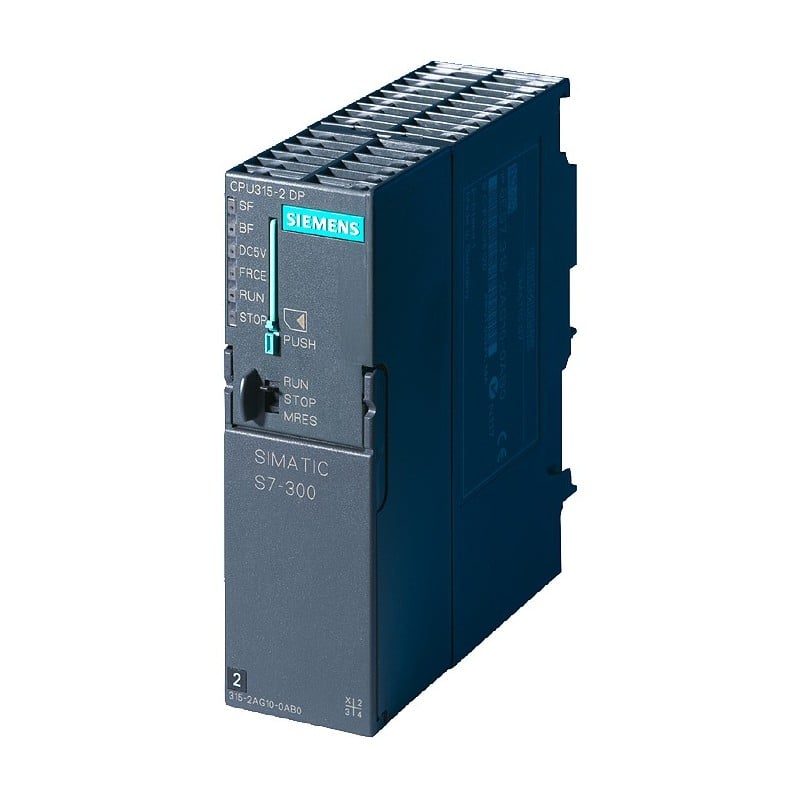
Common 6ES7315-2AG10-0AB0 Failures We See in Our Repair Lab
We test and repair S7-300 CPUs every week. The 6ES7315-2AG10-0AB0 follows a consistent failure pattern, and most of it comes down to age and environment:
- MMC or memory card slot faults. The CPU goes to STOP and the SF LED lights up. Often the card itself is corrupted, not the CPU. Always try a known-good MMC with a backup of the program before condemning the CPU.
- PROFIBUS DP communication failure (BF LED). In our lab, about half of these turn out to be the DP connector, cable, or termination resistor, not the CPU. The rest is a damaged DP transceiver on the CPU board, usually after a surge on the bus.
- Backplane bus connector wear. The U-connector between the CPU and the first I/O module oxidizes over the years. Symptoms are random I/O faults that disappear when you reseat the rack.
- 24 V input circuit damage. Voltage spikes from a failing PS307 power supply take out the input protection stage. The CPU appears dead; often it is repairable at board level.
- Aging electrolytic capacitors. Units approaching 15–20 years show intermittent STOP events, especially when warm. Capacitor replacement on the power section usually fixes it.
CPU in STOP with SF or BF LEDs on? Send us the LED status and, if readable, the diagnostic buffer entries. Our engineers will tell you whether your 6ES7315-2AG10-0AB0 looks repairable before you spend anything: [email protected]
Compatible and Replacement Models
You have two directions when the exact 6ES7315-2AG10-0AB0 is not on the shelf:
- Same-for-same replacement. A tested used or refurbished 6ES7315-2AG10-0AB0 CPU unit is the fastest option. Move your MMC over, apply power, and the machine runs. No program changes, no re-wiring.
- Successor migration. The 6ES7315-2AH14-0AB0 is the official successor and a functional replacement for most applications. Check two things first: your STEP 7 hardware catalog must support the newer firmware, and cycle-time-critical code should be re-tested because the newer CPU executes faster.
One caution from experience: the program lives on the MMC, not inside the CPU. If the card is damaged and you have no backup, a new CPU alone will not save you. Archive the project while the machine still runs. Our SIMATIC STEP 7 programming guide covers uploading and archiving projects.
New vs. Used vs. Repair: Which Option Makes Sense?
Because the 6ES7315-2AG10-0AB0 is discontinued, “new from the factory” is effectively off the table. Here is how the real options compare:
| Option | Relative cost | Typical lead time | Best when |
|---|---|---|---|
| Tested used / refurbished unit | Low | Days (48h dispatch from stock) | You need the machine running this week |
| Repair your faulty CPU | Lowest (save up to 75% vs. new) | 3–5 working days standard | The fault is diagnosed and not urgent-same-day |
| Migrate to 6ES7315-2AH14-0AB0 | Medium | Depends on stock | You are planning a spares standardization anyway |
| New old stock (sealed) | High | Weeks, if found | Site policy forbids used parts |
For most maintenance teams, the decision is simple: if the line is down, take the tested replacement now and send the faulty unit for repair afterwards. That gives you a running machine and a spare on the shelf. Our article on how to repair, refurbish, or replace obsolete parts covers this framework in more depth.
How to Replace a 6ES7315-2AG10-0AB0 Without Losing Your Program
- Step 1: Upload the current program. Connect via MPI or PROFIBUS and upload the blocks from the CPU. If the CPU is already dead, skip to Step 3 and rely on your MMC.
- Step 2: Record the hardware configuration. Note the DP address and baud rate. A wrong PROFIBUS address is the number one reason a swapped CPU stays in fault.
- Step 3: Power down and remove the MMC. Pull the card from the old CPU and inspect the contacts for corrosion.
- Step 4: Fit the replacement CPU. Seat the backplane bus connector firmly, insert the MMC, and reconnect the MPI and PROFIBUS cables.
- Step 5: Power up and verify. The CPU should copy the program from the MMC and go to RUN. Check that the BF LED stays off before restarting the machine cycle.
FAQ
Is the 6ES7315-2AG10-0AB0 discontinued?
Yes. Siemens has phased out this CPU version and replaced it with the 6ES7315-2AH14-0AB0. The S7-300 platform as a whole is also in its phase-out stage, so tested used and refurbished units are now the main supply channel for the -2AG10.
Can I replace a 6ES7315-2AG10-0AB0 with a 6ES7315-2AH14-0AB0?
In most cases, yes. The -2AH14 is the direct successor with more work memory (256 KB). Update your STEP 7 hardware catalog, verify the program compiles against the newer CPU, and re-test any cycle-time-critical logic before production.
Will I lose my program when the CPU fails?
Usually not. The program is stored on the Micro Memory Card, which survives most CPU failures. Move the MMC to the replacement CPU and power up. The real risk is a damaged MMC with no backup, so archive your STEP 7 project regularly.
Get Your Replacement Fast
Need a 6ES7315-2AG10-0AB0 back in your rack? We keep tested S7-300 CPUs in stock alongside 100,000+ automation SKUs, all function-tested, shipped within 48 hours, no MOQ. Send us your part number and fault description: [email protected] or WhatsApp +86 15107352558. If repair makes more sense, our lab will quote it within one working day.