

Servo motors are an essential part of modern automation systems. From CNC machines and robotics to home automation and industrial production lines, they provide precise motion control that’s critical in countless applications. Whether you’re an engineer, maintenance technician, or hobbyist working with automation systems, knowing how to test a servo motor is a must-have skill.
In this article, we’ll cover everything you need to know about testing a servo motor, including:
- What is a servo motor?
- Types of servo motors
- Common signs of a faulty servo
- Tools you need for testing
- Step-by-step testing methods
- Safety precautions
- Pro tips from automation experts
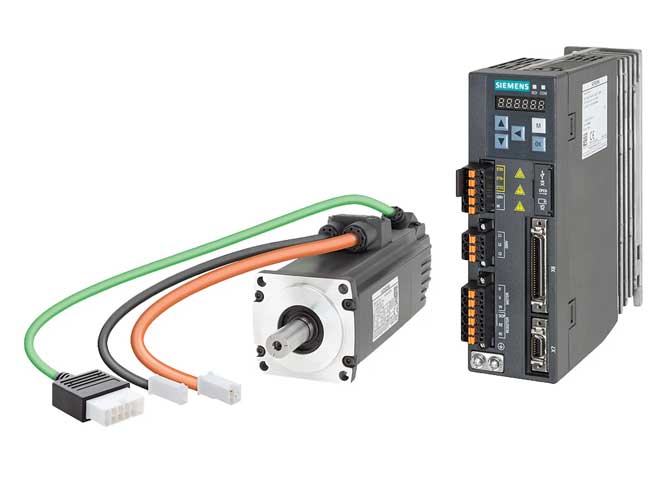
1. What Is a Servo Motor?
A servo motor is a type of electric motor that enables precise control of angular or linear position, velocity, and acceleration. It works through a closed-loop feedback mechanism, where sensors provide data on the motor’s position, allowing a controller to make real-time adjustments.
Servo motors are commonly used in:
- Industrial automation systems (FANUC, Siemens, Mitsubishi, Yaskawa, ABB)
- Robotics and CNC machines
- Conveyor belts
- Camera gimbals
- Remote-controlled vehicles and drones
2. Types of Servo Motors
Before testing, it’s essential to identify the type of servo motor you’re working with. The main categories include:
a. DC Servo Motors
Used in low-power applications. Simple to test but limited in torque.
b. AC Servo Motors
Common in industrial automation, such as FANUC or Mitsubishi systems. They offer high efficiency, torque, and precision.
c. Brushless Servo Motors
Use electronic commutation. Low maintenance and long lifespan.
d. Positional Rotation Servos
Typically rotate within 0–180 degrees. Often used in hobby and Arduino applications.
e. Continuous Rotation Servos
Can rotate 360° and are used in driving wheels or gears.
Each type may require slightly different test procedures, though the core concepts remain the same.
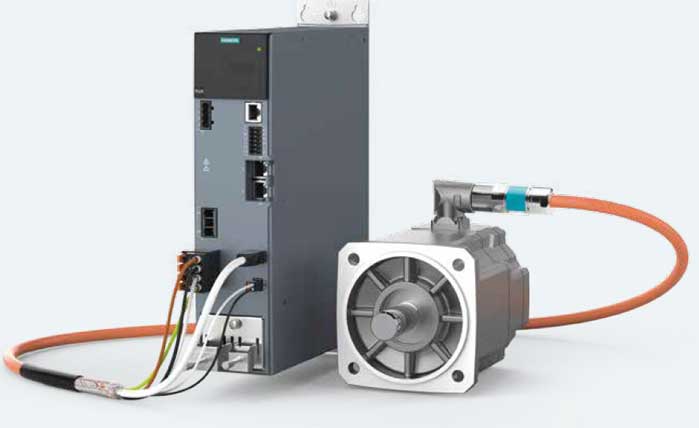
3. Signs That Your Servo Motor Needs Testing
If your equipment is experiencing issues, the servo motor might be at fault. Look for these symptoms:
- Erratic or jerky movements
- Failure to reach the desired position
- Overheating
- Unusual noises or vibration
- No response from the motor
- Alarms or fault codes from the controller
Ignoring these signs can lead to further damage in the control system or production downtime.
4. Tools Required for Testing a Servo Motor
To properly test a servo motor, you’ll need the following equipment:
| Tool | Purpose |
|---|---|
| Multimeter | Measure voltage, resistance, and continuity |
| Oscilloscope (optional) | Analyze PWM signals and encoder feedback |
| Power Supply or Controller | Power the servo motor under controlled conditions |
| Signal Generator (PWM) | Generate control signals |
| Diagnostic Software | Provided by manufacturers like FANUC or Siemens |
| Test Cables and Connectors | Secure and safe connections |
| Safety Gear (gloves, glasses) | Prevent electric shock or mechanical injury |
Found a Fault? Don’t Buy the Wrong Replacement.
Send us your servo motor part number and photos of the nameplate. OUKE can check compatibility, availability and a replacement quote — within 24 hours.
5. Step-by-Step: How to Test a Servo Motor
Step 1: Identify Motor Specifications
Check the nameplate or data sheet of the motor. Take note of:
- Rated voltage
- Rated current
- Type of encoder (incremental, absolute)
- Wiring diagram
- Manufacturer guidelines (especially for FANUC, Yaskawa, etc.)
Step 2: Visual Inspection
Before applying power:
- Inspect for burnt marks or unusual smell
- Check for loose wires, bent pins, or damaged connectors
- Rotate the motor shaft manually — it should rotate smoothly (for most types)
Step 3: Check Resistance With a Multimeter
For a 3-phase AC servo motor:
- Set your multimeter to ohms (Ω).
- Measure resistance between phases:
- U to V
- V to W
- W to U
All readings should be similar and non-zero. A large difference or infinite reading suggests winding failure.
Check for grounding:
- Measure between each phase and motor housing (ground).
- Reading should be infinite or no continuity.
⚠️ A short between any winding and ground indicates insulation failure.
Step 4: Test Encoder Signals (Optional)
Use an oscilloscope or diagnostic software:
- Connect the encoder to the oscilloscope.
- Slowly rotate the shaft by hand.
- Look for clean square wave signals from the A, B, and Z channels (incremental) or serial data (absolute encoders).
If the signal is noisy or missing, the encoder may be faulty.
Step 5: Apply PWM Signal (For Arduino/Small Servo Motors)
If you are testing a hobby servo (e.g., SG90 or MG996R):
- Connect servo to a PWM signal generator (e.g., Arduino).
- Send signals between 1ms–2ms pulse width at 50Hz.
- 1ms = 0°
- 1.5ms = 90°
- 2ms = 180°
- Observe motor response.
If the motor does not respond, confirm power supply and signal lines.
Step 6: Functional Test Under Load
For industrial servo motors:
- Connect the motor to its original drive or an appropriate test controller.
- Use software to initiate a jog test or positioning routine.
- Check torque response, speed control, and stop/start behavior.
Record vibration or error logs if available.
6. Safety Guidelines When Testing Servo Motors
- Always disconnect power before handling wires.
- Use insulated tools and wear protective gear.
- Don’t touch the motor shaft while powered.
- Confirm correct voltage range before applying power.
- Avoid testing in a humid or conductive environment.
- For large motors, use a secure test rig to avoid mechanical injury.
7. Common Issues and How to Solve Them
| Issue | Possible Cause | Solution |
|---|---|---|
| Motor doesn’t rotate | Signal missing / Power issue | Check PWM or supply voltage |
| Motor vibrates or hums | Encoder misalignment / Winding damage | Recalibrate encoder / Repair coil |
| Positioning errors | Feedback loop fault | Test encoder / Replace drive |
| Overheating | Overload or poor ventilation | Reduce load / Improve airflow |
| Fault codes on controller | Drive or servo alarm | Refer to manufacturer’s manual |
8. Expert Tips from Automation Industry
- For FANUC and Mitsubishi systems, use the official testing tools or software (like FANUC’s SERVO GUIDE).
- For older systems with limited diagnostics, logging temperature and vibration trends can reveal hidden faults.
- Always keep a log of test results for predictive maintenance planning.
- When testing discontinued or obsolete models, consult global suppliers like OUKE Automation for compatible replacements.
9. Final Thoughts
Testing a servo motor is not just about identifying faults—it’s about understanding system health and preventing costly downtimes. Whether you’re working with a small Arduino setup or a large-scale industrial CNC system, having a structured test process will improve reliability, reduce maintenance costs, and ensure optimal performance.
By mastering the fundamentals outlined in this article, you can extend the life of your servo systems and ensure safe, efficient operation in any application.
FAQs
Q1: Can I test a servo motor without a controller?
Yes, using a PWM generator or Arduino, you can test basic servo movement. For industrial motors, a compatible drive or test software is recommended.
Q2: How do I know if my servo motor is dead?
If the motor shows no continuity between windings, gives no response to PWM signals, or its encoder doesn’t output signals, it’s likely dead.
Q3: Is testing a servo motor dangerous?
If proper precautions are not followed, yes. Always power off before wiring, use protective gear, and never test under unstable conditions.