

The 1756-L61 is the Allen-Bradley ControlLogix 5561 controller — a legacy CPU still running thousands of production lines years after Rockwell moved it to mature status. If you maintain one, your three recurring questions are always the same: when do I change the battery, what firmware can it run, and what do I do when it finally fails? This guide answers all three, from a team that repairs and supplies these controllers every week.
What Is the 1756-L61?
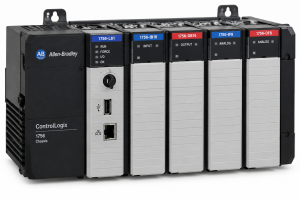
The 1756-L61 — also written as the Logix5561 — is a chassis-based ControlLogix controller with 2 MB of user memory. It sits in a 1756 chassis alongside I/O and communication modules (Ethernet via 1756-ENBT, ControlNet via 1756-CNBR, and so on), and it is programmed with RSLogix 5000 / Studio 5000.
It has no built-in communication ports of its own — everything goes through the chassis modules. That modularity is why so many of these systems are still in service: individual modules can be replaced without touching the rest. Our Allen-Bradley product overview shows the ControlLogix modules we keep alongside these CPUs.
1756-L61 Key Facts
| Item | Detail |
|---|---|
| Model | 1756-L61 (ControlLogix Logix5561) |
| User memory | 2 MB (L62 = 4 MB, L63 = 8 MB) |
| Platform | ControlLogix, chassis-based (1756 series) |
| Memory backup | Battery-backed (see battery section below) |
| Communications | Via chassis modules (1756-ENBT, 1756-CNBR, etc.) |
| Programming | RSLogix 5000 / Studio 5000 |
| Lifecycle status | Discontinued / mature — no longer sold new by Rockwell |
1756-L61 Battery: The Failure You Can Schedule
The 1756-L61’s memory is volatile — the battery keeps your program alive when power is off. This makes battery management the single most important maintenance task on this controller:
- Know the signs. A low battery shows up as a flashing BAT indicator on the controller and a minor fault in the software. Treat it as urgent, not routine.
- Replace on schedule, not on failure. In warm cabinets, battery life drops significantly. Most plants settle on a 12–18 month preventive replacement cycle.
- Replace with power on. The controller’s internal capacitance holds memory briefly during the swap — but only if the chassis stays powered. Power off with a dead battery and the program is gone.
- Always keep a current program backup. This is the real insurance. If you do not have a recent upload stored safely, schedule one this week.
If you have never uploaded from a running controller, our PLC programming best practices guide covers backup habits that prevent exactly this kind of disaster.
1756-L61 Firmware: What You Need to Know
Firmware questions come up constantly with this CPU because it sits in the middle of the Logix timeline:
- It runs the classic Logix firmware range — not the latest Studio 5000 revisions. Before flashing anything, confirm the exact compatibility for your series and revision.
- Match firmware to your project file. A controller flashed to a different major revision than your saved project will not accept the download without conversion work. Always record the firmware revision alongside your program backup.
- Do not flash as a repair attempt. If a controller is behaving erratically, a firmware flash rarely fixes hardware — and a failed flash can brick a unit that was recoverable. Diagnose first.
Common 1756-L61 Failures We See in Our Repair Lab
- Memory loss after power events. Almost always battery-related, and almost always preventable. The CPU itself is usually fine — but the production loss is real.
- Failure to boot / solid fault indicators. Backplane power issues, corrupted memory, or genuine CPU board failure. We bench-test with known-good chassis and power supplies to isolate it.
- Intermittent faults in hot cabinets. Aging components plus heat equals random major faults. These units often test “fine” cold — we soak-test under temperature to reproduce the fault.
- Physical damage. Bent backplane pins and damaged connectors from rough insertion. Often repairable if caught before board traces are torn.
1756-L61 faulted and you are not sure whether it is the CPU, the power supply, or the chassis? Send us the LED states on the controller and the rack power supply — that combination narrows it down fast. Free assessment: [email protected]
Replace, Repair, or Migrate?
| Option | Typical cost | Effort | Best when |
|---|---|---|---|
| Repair your 1756-L61 | Lowest — save up to 75% | 3–5 days standard | The CPU has a hardware fault and you have a program backup |
| Tested replacement 1756-L61 | Moderate | Ships in 48 hours | You want like-for-like: download your backup and run |
| Migrate to a newer Logix CPU | Highest | Days to weeks | You are planning a line upgrade anyway — not an emergency fix |
Our honest advice for most plants: do not migrate under pressure. Migration means program conversion, communication reconfiguration, and testing — it is a project, not a repair. A tested 1756-L61 from stock, or a repair of your own unit, gets the line running this week. Plan migration on your own schedule, not on the failure’s schedule.
1756-L61 and ControlLogix Stock at OUKE
We supply tested ControlLogix CPUs and modules — from processors to I/O like the 1756-IF8 analog input module — all bench-tested before shipping. Orders leave our Dongguan warehouse within 48 hours via DHL, FedEx, or UPS, with a minimum 1-year warranty and no MOQ. CPU repairs run 3–5 working days standard.
FAQ
Is the 1756-L61 obsolete?
Yes — Rockwell has moved the Logix5561 to discontinued/mature status and no longer sells it new. Tested surplus, refurbished, and repaired units from specialist suppliers like OUKE are the standard way to keep these systems running.
How often should I replace the 1756-L61 battery?
Most plants use a 12–18 month preventive cycle, shortened in hot cabinets. Replace with the chassis powered on, and never treat a flashing BAT indicator as something to deal with “later.”
What happens if the battery dies while the machine is powered off?
The controller loses its program and data memory. You will need a saved project file to reload it — which is why a current backup matters more than any hardware spare.
Can I replace my 1756-L61 with an L62 or L63?
They are the same generation with more memory (4 MB / 8 MB), so a larger-memory sibling is often a workable substitute if your program fits and firmware matches. Confirm firmware revision compatibility before swapping.
My L61 shows a major fault after a power outage. Is it dead?
Not necessarily. Check the battery state, reseat the controller, and try reloading your saved program. If it still will not boot, the CPU needs bench diagnosis — send us the LED states and we will help you assess it first.
Get Your 1756-L61 Back Running Fast
Need a tested 1756-L61 or a repair quote for your faulted CPU? We have 100,000+ SKUs in stock, all tested, shipped within 48 hours — no MOQ. Send us your part number: [email protected] or WhatsApp +86 15107352558.